
Every feature, in detail.
The register, the kitchen and the back office, area by area, with the plan that includes each one.
- POS Skillet POS, $89/month
- Insights Skillet Insights, $199/month
- Complete Skillet Complete, $299/month
Short on time?
The whole tour in 60 seconds.
Watch the main features in action first, then read the detail for each area below.
Register
Fast at the counter, clear for new staff, and it keeps selling when the internet drops.
POSComplete
-
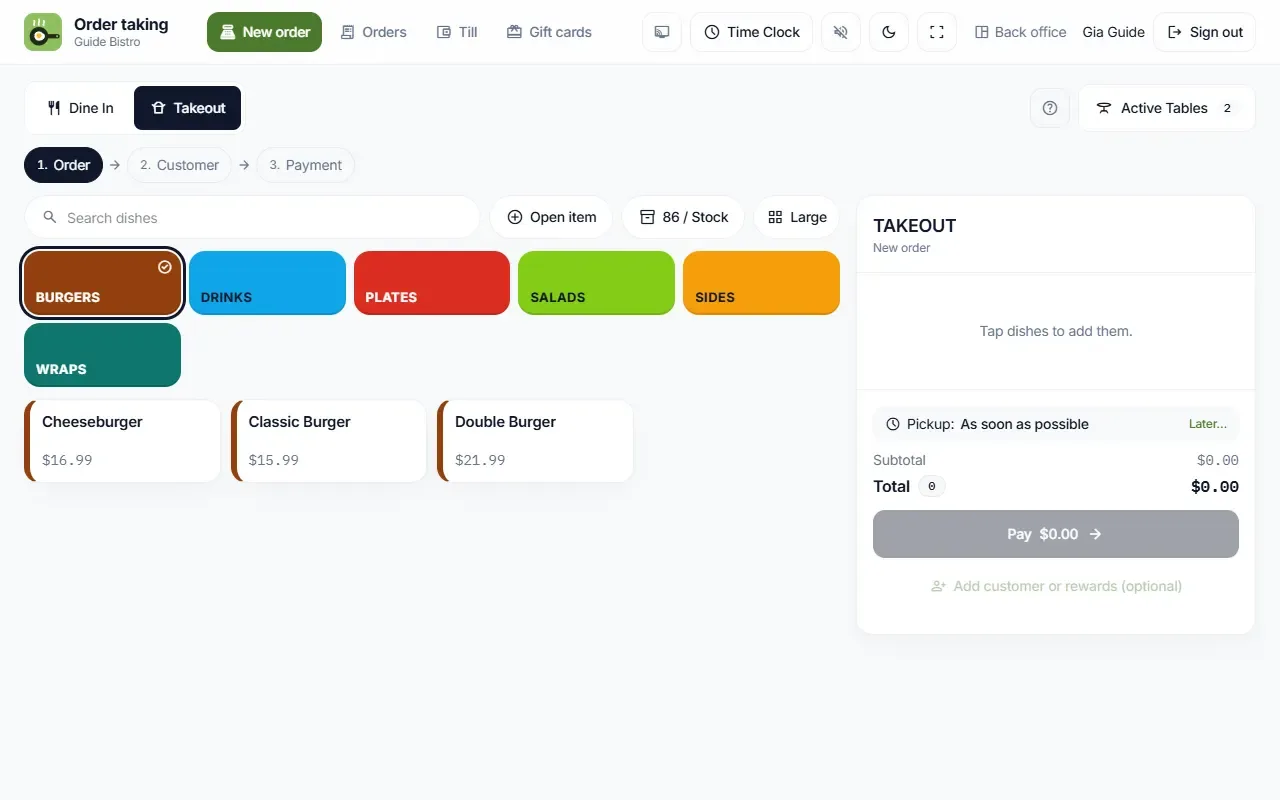
Colour-coded tiles
Categories as bright tiles in your colours and order, dishes as large tiles. Rearrange them with drag and drop, and set the tile size per tablet.
-
Dish search and Open item
Find any dish in a few letters, or ring in something that isn't on the menu at a typed price.
-
Choices beside the order
Sizes, toppings and sides open in a panel next to the order, move on after each answer, and "Add & repeat" adds several of the same dish.
-
No / Light / Extra and pizza halves
Changes go straight to the kitchen. Pizzas support whole or half toppings, extras, meats that count as two, and prices by size.
-
Every kind of order
Takeout, dine-in with tables and seats, pickup later, and delivery-app orders, from the same screen.
-
Payments recorded
Cash with change, card on your own terminal, gift card or house account. Skillet records every payment, and adds no fee to payments on your own terminal.
-
Split bills, tips and tax exemption
Split evenly, by seat or by item. Add tips, and mark an order tax-exempt when it applies.
-
Manager approvals
Voids, comps and discounts need a manager's PIN, and every one shows in the reports.
-
Sold out and portion limits
86 a dish or set a portion limit right on the register, so nobody sells what you are out of.
-
The till
Opening float, cash drops, the end-of-day count and an end-of-shift checkout for each staff member.
-
Works offline
The register keeps taking orders without internet and catches up when the connection is back.
-
Payment alarm
A loud, repeating alert when a card payment is refused, so nobody walks out without paying.
-
Built for the counter
Dark screen and full-screen mode per tablet, a tap sound on or off, and terminals locked to the register.
Dine-in and tables
Everything a dining room needs, on the same system as the counter and the kitchen.
POSComplete
-
Floor plan
Your dining room with its tables and seats. See at a glance which tables are free, seated, open or waiting for their next course.
-
Tables, seats and open tabs
Orders by table and seat, tabs that stay open through the meal, and rush tickets for the kitchen.
-
Split by seat
Each guest pays for what they had, or split evenly, or by item.
-
Coursing
Hold and fire courses, by hand or automatically once the previous course is done.
-
QR table ordering
Guests scan a code at the table and order, and the order goes straight to the kitchen.
Complete
-
Reservations and waitlist
A host stand, a public booking page and email updates to guests.
Complete
Kitchen display
A screen you can read across the line, with the build for every dish.
POSComplete
-
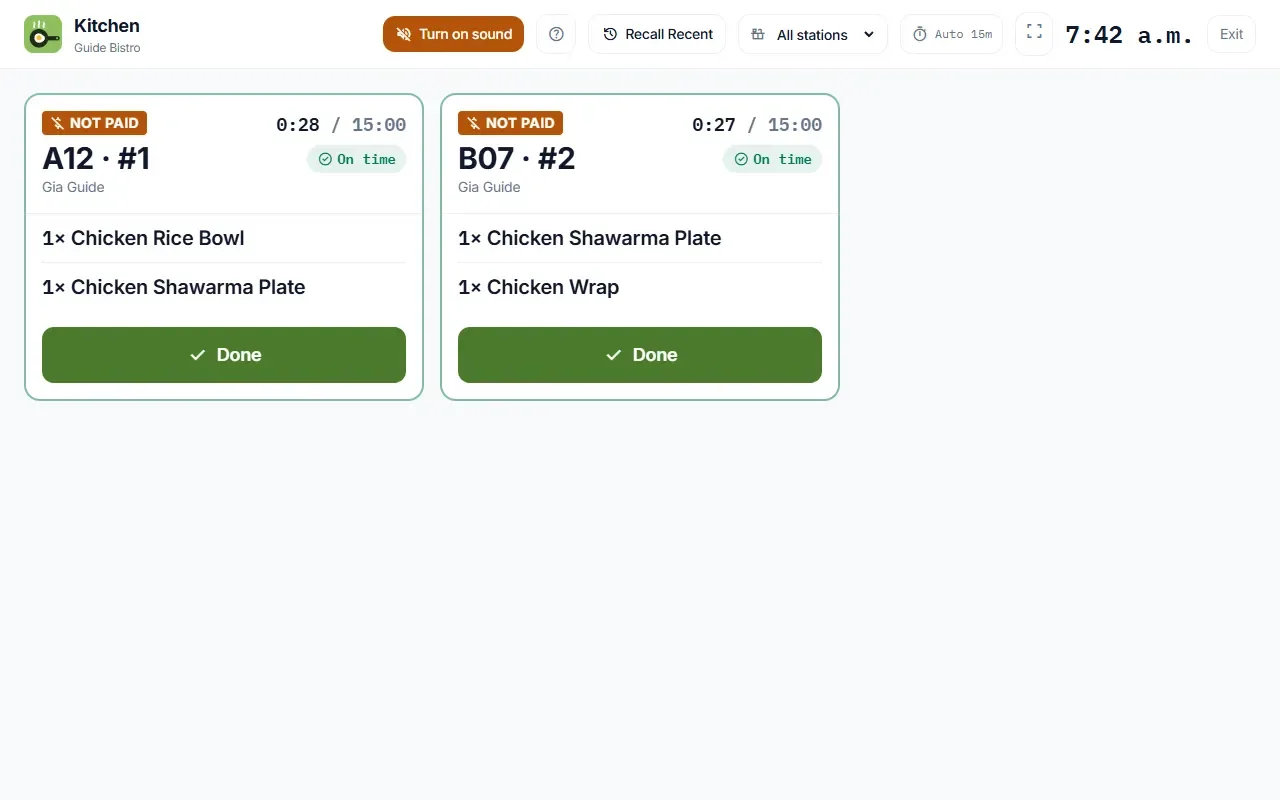
Tickets by station
Each station sees its own dishes, oldest first, with timers on every ticket.
-
Build lists
What goes into each dish, in assembly order, with changes in red: NO onions, EXTRA cheese.
-
Paid or not paid
Every ticket shows whether it's paid. Kiosk orders reach the kitchen only once paid.
-
Delivery orders
Delivery-app tickets show which app and the ready-by time.
-
Bump, recall and auto-clear
Bump a ticket when it's done, recall it if it went too soon, or clear tickets automatically after a set time.
-
New-ticket sounds
Cha-ching, coins, bell, order-up, or your own upload, with volume and repeats.
-
Printers and the cash drawer
Kitchen and receipt printers and the cash drawer, through the print bridge on a restaurant PC. Use screens, paper, or both.
Customers ordering for themselves
More ways to take orders, without more staff or app commissions.
Complete
- Burgers
- Wraps
- Sides
- Plates
- Drinks
-
Self-order kiosk
A tablet customers order on, in your colours, fonts and logo.
-
Customer display
Faces the customer at the counter and shows their order, the total and your promotions.
-
Online ordering page
Your own commission-free ordering page for pickup, with your link and QR code.
-
QR table ordering
Guests order from their table; the order lands in the kitchen.
-
Scheduled orders
Customers order now for later, and the kitchen gets it in time.
-
Hours and holidays
Online, QR and kiosk ordering follow your hours and holidays. Outside hours, customers can order ahead.
Loyalty, gift cards and promotions
Bring guests back and give them a reason to spend more.
Complete
-
Loyalty points
Points per dollar, rewards redeemed at the register, and a rewards page for customers.
-
Gift cards
Sell, top up and pay with gift cards; they count in the till.
-
Customer directory
Every customer with their visits and spend.
-
Combos and deals
Combo dishes with choices, and happy-hour prices.
-
Promo codes and service charges
Codes for your own promotions, and service charges where you need them.
Menu, costing and profit
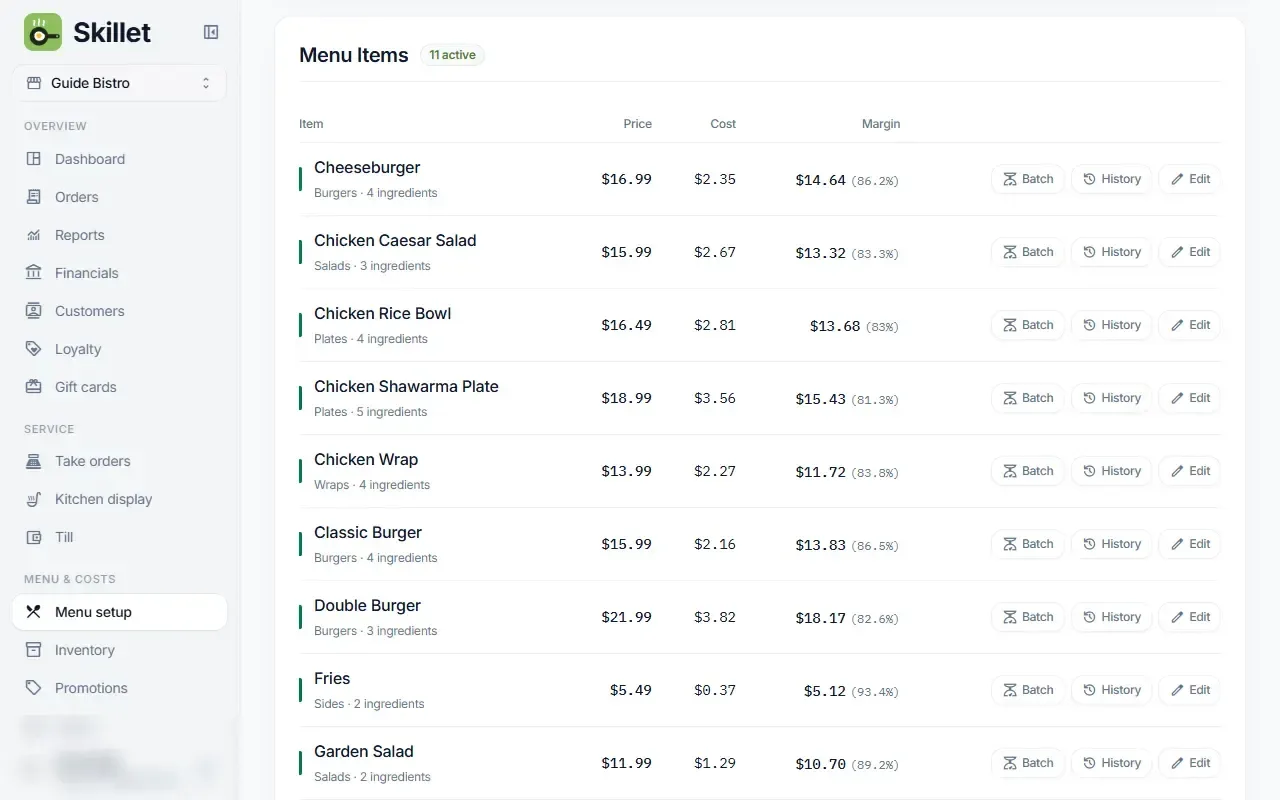
The real cost and margin of every dish, from what you actually pay.
InsightsComplete
-
Ingredients as you buy them
Suppliers, pack sizes and yield (what's usable after trimming), with every price change kept.
-
Prep items and recipe versions
Sauces and doughs costed from their own recipes. Recipe versions keep past reports true.
-
Food cost and margin per dish
Every dish costed from your prices. On Skillet Complete it updates live with every order the kitchen cooks.
-
Profit dashboard and prime cost
Sales, food cost and margin, plus prime cost: food plus labour against sales, the number that decides whether a restaurant survives.
-
Margin and price-spike alerts
When a dish slips below your target, or a supplier's price jumps 5% or more, Skillet tells you why and suggests the fix: a new price or portion.
-
Imports
Bring in your menu, ingredients, recipes and past sales from Toast and other POS exports or spreadsheets.
-
Supplier invoices
Upload an invoice, check the lines and confirm. Skillet remembers each supplier's wording.
-
Stock
Counts that show waste, theft or recipe drift, a waste log and weekly cost of goods. On Skillet Complete, stock goes down with every order sent to the kitchen.
-
Reports and the Monday digest
Sales, servers, voids and comps, cash drawer and shift reports, each as CSV, and a Monday email with the week's numbers and what to fix.
Delivery apps
Every app priced right, with the payouts checked.
Complete
-
Delivery orders by app
Ring in Uber Eats, DoorDash and SkipTheDishes orders by app, alongside your in-house orders.
-
Per-app prices
A markup per app, rounded up to .99, plus set prices and hidden dishes on each app, and a price list to copy into each app.
-
Commission and payouts
Profit per dish after each app's commission, payout statements, and Financials that flag commission differences, refunds and missing orders.
InsightsComplete
-
Orders API
Your own website or app can send orders straight in, with a key.
People and labour
Plan the week, clock people in, and keep labour next to sales.
InsightsComplete
-
Schedule planner
Drag-and-drop shifts with presets, published to staff. Each person has their own schedule page.
-
PIN and photo time clock
Staff punch in on a register tablet with their PIN and a photo.
-
Timesheets for payroll
Hours with wages, as CSV for your payroll.
-
Tip sharing
Tip-outs and a tip pool by hours and role, saved by pay period.
-
Roles and permissions
Manager, Kitchen and Front of house to start, each with its own access. Staff sign in with a PIN, no email needed.
All plans
Several locations and franchises
One login across every store.
InsightsComplete
-
All-locations roll-up
Switch between stores, or see every location's numbers together.
-
Franchise brands
One master recipe book; each location joins with a code and gets the menu, costed at its own prices. Royalty and marketing fees on net sales.
Owner tools
Set up quickly, stay in control, and keep your data.
All plans
- ✓Restaurant details
- ✓Menu and choices
- ✓What you buy
- ✓Team and PINs
- Devices
- Delivery apps
-
Setup wizard and sample menu
Walks you through your restaurant, menu, team and devices. A sample menu lets staff practise before you go live.
-
Device pairing
Turn any tablet into a register, kitchen screen, kiosk or customer display with "Set up this device".
-
Locked terminals
A device set up as a register shows only that, and you can sign out any terminal remotely.
-
Two-step sign-in
A code from an authenticator app or by email, for owners.
-
Your data, exportable
Export your sales and menus whenever you like.
-
Plan and billing
Your plan, any promo code, your card and every invoice, in one place.
-
Done-for-you setup
Optional: we set up your menu, recipes and costing for you. Just ask.
Apps and devices
No hardware to buy and no per-device fees.
All plans
-
Any browser
Runs in any modern browser on tablets, phones and computers, and installs like an app.
-
Android apps
Skillet POS, Skillet Kitchen, Skillet Manager and Skillet Team. iPhone and iPad apps are coming soon.
-
Print bridge
A small program on a restaurant PC that sends tickets and receipts to network printers and opens the cash drawer.
See which plan fits, or try every feature free for 30 days.
See what your dishes really make.
Try Skillet free for 30 days, or book a walkthrough with someone who has run restaurants.
Plans from $89 CAD per location, per month. No per-device fees.